
Introduction
This section provides everything you need to develop Nordic PMIC‑based applications using the Zephyr RTOS, including documentation, drivers, downloads, and development resources. It covers PMIC support in nRF Connect SDK and Zephyr, explains how the drivers are structured and integrated, and links to relevant samples and guides to help you get started quickly and build robust applications.
nRF Connect SDK and Zephyr integration
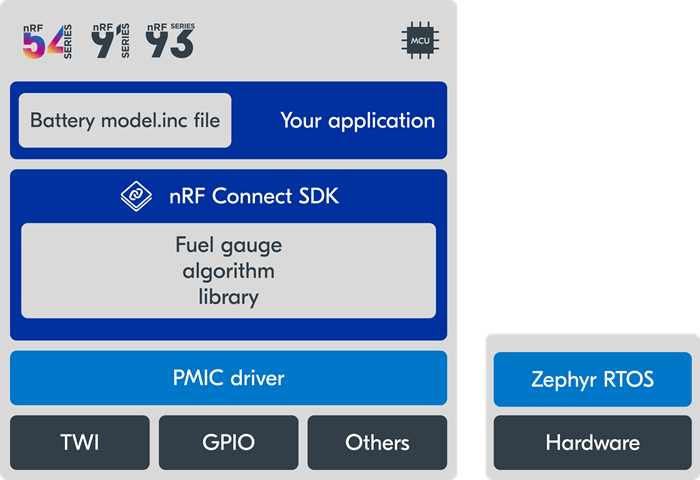
Nordic PMICs are supported in nRF Connect SDK by means of native Zephyr drivers.
An application based on nRF Connect SDK can utilize functionality from both nRF Connect SDK and the Zephyr RTOS.
In the architecture diagram above, the application is using a Nordic PMIC and the Fuel Gauge algorithm. The application holds the battery model file, while the algorithm itself resides in nRF Connect SDK. Although the PMIC drivers are part of Zephyr RTOS, the application uses them transparently as they would any other device driver following the Zephyr driver model. The hardware functions used to interact with the PMIC (TWI, GPIO) are shown at the very bottom of the diagram. The application never needs to explicitly call low-level hardware functions to configure and interact with the PMIC, as this is handled by the driver.
The application developer decides which PMIC parameters to use, e.g. regulator voltage or charging current, at compile time by setting Devicetree properties for the application.
An application based on Zephyr RTOS directly can utilize the PMIC drivers, but in order to use the Fuel Gauge library it needs to be manually copied from nRF Connect SDK into the Zephyr application.
Zephyr drivers
Nordic PMICs are considered “multi-function devices” (MFD), with functionality that spans several different driver classes in Zephyr. As such, there is no central location in nRF Connect SDK or Zephyr where all the PMIC driver source code files are located.
Each PMIC device is supported by a group of Zephyr native drivers. For example, the BOOST regulator of the nPM2100 is accessed via the Zephyr Regulator API, while the nPM2100 watchdog is accessed via the Zephyr Watchdog API. These are two different driver categories used to access functionality on the same PMIC.
Note that the PMIC can still be fully accessed via the Zephyr I2C API, if one needs to read or write registers directly.
Below is a list of PMIC part numbers, where each entry links directly to the corresponding driver documentation and supported functions.
nPM1100: Regulator
nPM1300: Regulator | MFD | GPIO | Watchdog | Charger (sensor) | LED
nPM1304: Regulator | MFD | GPIO | Watchdog | Charger (sensor) | LED
PMIC support in nRF Connect SDK
PMIC support was introduced in nRF Connect SDK as follows.
nPM1100 - v2.3.0
nPM1300 - v2.4.0
nPM1304 - v3.1.0
nPM2100 - v3.0.0
nPM6001 - v2.3.0
Fuel Gauge library
The Fuel Gauge algorithm is included in nRF Connect SDK. When developing an nRF Connect SDK application using a Nordic MCU, no manual steps are required in order to start using it.
When developing a Zephyr application using an MCU with a supported Fuel Gauge architecture, one must manually copy the Fuel Gauge library and add the relevant library file to be linked with the application.
Zephyr samples
nRF Connect SDK includes samples and guides for working with our PMICs. See the Developing with PMICs section of the nRF Connect SDK v3.2.4 documentation for a full list of samples and supported hardware.
Zephyr contains the following samples that uses Nordic PMICs. All of these samples require a relevant PMIC Evaluation Kit.
Development resources
Install the nRF Connect SDK to set up your development environment and get started
Develop with PMICs using step‑by‑step guides, drivers, and fuel gauge integration.
Explore PMIC sample applications to see practical examples and reference implementations.