
Introduction
This section provides all information, documentation, downloads, and development resources needed to use Nordic PMICs with bare‑metal drivers. It is intended for applications that does not use Zephyr or nRF Connect SDK, and explains how to integrate PMIC functionality directly into a custom software environment using generic and platform‑independent drivers.
Software architecture
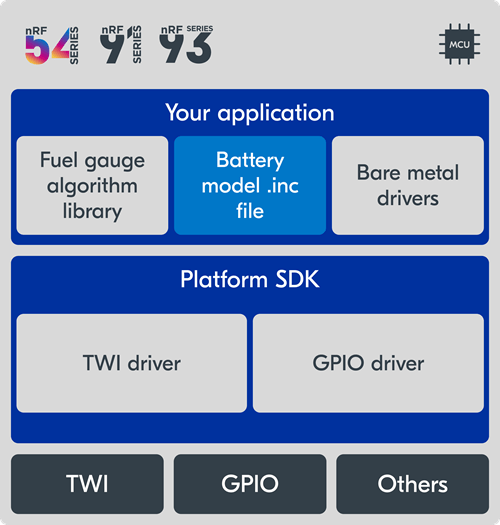
In a bare metal application, much of the low-level interaction with the PMIC hardware is handled from the application level. The driver is not designed to integrate with any specific SDK or platform, so the application needs to configure the hardware abstractions required by the driver. The application calls the various driver functions to configure PMIC properties, such as charger current or regulator voltages, and make battery measurements as needed.
In the architecture diagram above, the application uses a Nordic PMIC and the Fuel Gauge algorithm. The MCU can be any Nordic or non-Nordic device with a supported CPU architecture that has sufficient RAM and code space to run the Fuel Gauge algorithm. In this case, both the application-specific battery model and the algorithm resides in the application level.
Bare metal development
Applications that do not use nRF Connect SDK, Zephyr, or even a Nordic SoC, can utilize the bare metal driver for a given PMIC.
The drivers do not depend on a specific OS or SDK environment, or any particular SoC. Necessary hardware functions such as TWI and GPIO are exposed via function pointers in the bare metal driver which must be provided by the application developer.
There is no single bare metal driver collection that supports all Nordic PMICs. Each PMIC has its own specific driver, tailored to fit the hardware features in an efficient and intuitive manner.
To integrate a bare metal driver in a project, copy the relevant files from the driver into your project and implement the necessary hardware abstraction functions for TWI communication. Follow the readme and porting guide when available and use the samples as a reference.
Fuel Gauge library
When developing a bare metal application using an MCU with a supported Fuel Gauge architecture, one must manually copy the Fuel Gauge library and add the relevant library file to be linked with the application.
Bare metal samples
Note that the nPM1300/nPM1304 bare metal sample is using the nPM1300/nPM1304 bare metal driver in a Zephyr application. A typical Zephyr or nRF Connect SDK application would normally use the native Zephyr driver instead. This sample is provided as a reference for how to use the bare metal driver functions, and not intended to be Zephyr specific.
Development resources
nPM2100 bare metal driver download
nPM1300 and nPM1304 bare metal driver download
nPM2100 bare metal example using nRF5 SDK
Npmx sample applications
Nmpx nPM1300 and nPM1304 porting guide
nRF fuel gauge library